
Before you begin
Open the right visit and check client, services, price and already recorded payments.
This records money; it does not charge or refund a bank account. Paid closes settlement; partial payment leaves an outstanding balance. Enter the cumulative recorded amount, not just the next installment.
Step-by-step guide
Open Visit and payment
Review service value and the current payment badge. A suggested form value is not yet saved.
Choose the settlement state
Select unpaid, partial, paid or refunded. Use partial for a deposit when more is still due.
Enter the actual amount
For a 100 visit with a 30 deposit, record partial payment of 30. After receiving the remaining 70, record a paid total of 100, not 70 or 170. With a discount, enter the actual received total and deliberately choose whether settlement is closed.
Save payment
Save and wait for confirmation. Review the badge and balance afterward. The use-service-value action only fills the field.
Record the visit outcome separately
Completion or no-show actions are available for started pending or confirmed visits. Completion and payment saving are different actions. Account for separate business automation settings when enabled.
Record a refund separately
First return the money using your actual payment method, then select refunded and enter the returned amount. Check the saved card and report.
Reconcile analytics
Check period and currency. Received payments, refunds, completed-visit debt and expected future amounts have different meanings.
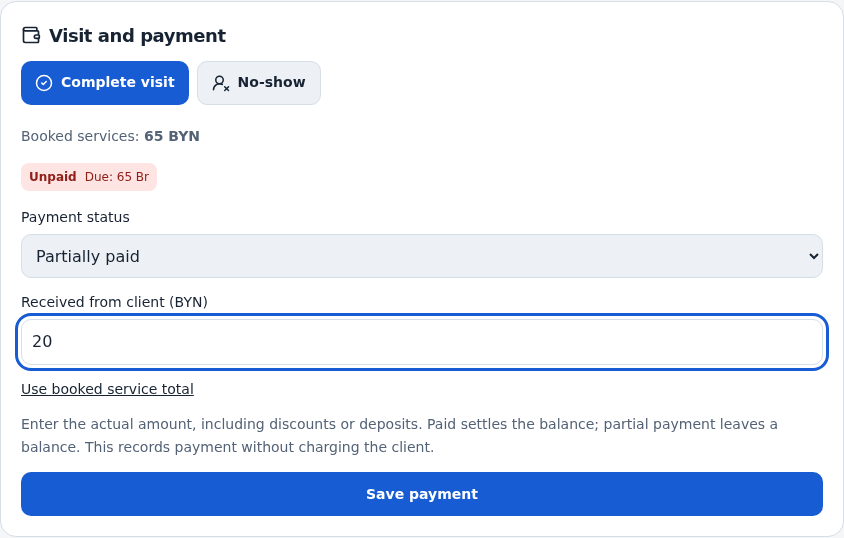
Check the result
The card records the correct settlement state and actual amount, with the visit outcome tracked separately.
Questions and solutions
Why does the form suggest Paid?
It is a suggestion, not a saved payment. Choose the correct state if you have not received money.
How do I record a discount?
Enter the actual total. Paid closes settlement even when it differs from service value; partial keeps an expected balance.
How do I record a second installment?
Update the cumulative received amount rather than entering only the new installment. Review the deposit example above.
Will a refund be sent to a card automatically?
No. This records a refund; moving real money is a separate action.
Why did automatic completion mark payment?
Check Mark full payment on automatic completion in business automation. It affects reports and needs a deliberate separate choice.