
Before you begin
The specialist needs services and working hours. Agree the first visit, interval and visit count with the client.
Book again creates a new visit; a series creates several. Before editing, check whether you are changing one visit or following visits too.
Step-by-step guide
Fill in the first visit
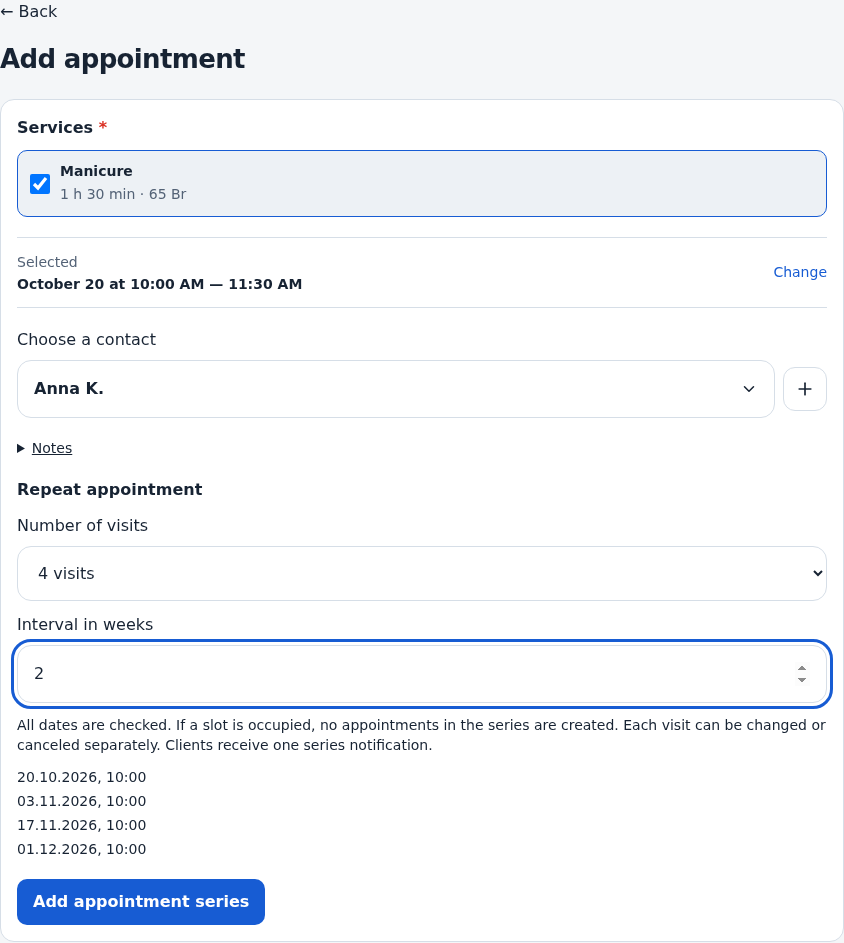
Open Add appointment. Choose specialist, services, client and start date. Review duration and end time.
Set count and interval
In appointment recurrence, choose the visit count. For several visits, set the interval in weeks and compare the displayed dates with your agreement.
Save the series
Review and submit. Resolve any availability error and check the first request’s outcome before creating the series again.
Check the calendar
Review the series dates under the right specialist. Check price and payment in each individual card.
Open a visit to make changes
Use rescheduling or editing. When offered, choose this visit only or this and following visits. Earlier visits should not be treated as part of a following-visit change.
Use Book again for a new single visit
Check the populated services and contacts, select a new date and save. This action does not move the original visit.
Check the result
The calendar contains the intended dates and edits use the correct series scope.
Questions and solutions
I want to move just one visit
Choose the current visit only and check neighboring series dates afterward.
I want to shift the remaining series
Choose current and following visits when offered. Read the confirmation and check the new dates.
One date has a conflict
Check hours, occupied periods and the displayed error. Review the calendar before retrying after a correction.
A repeated service is no longer available
Review the current prices for the new date and select available services again.
Does payment apply to the whole series?
Review payment separately in every visit. Creating or rescheduling a series does not pay for its appointments.